Data & internet access
Mozillion SIM plans include 4G and 5G data as standard. To enjoy 5G speeds, you’ll need a 5G compatible phone and be in a suitable coverage area.
How much data do I have?
Your plan includes a monthly data allowance, which resets at the start of each billing period. When you reach 80% of your data allowance, we’ll send you a text alert.
Once you’ve used all your monthly data, we’ll send you another text. If your data runs out, you won’t be able to use your plan to connect to the internet or use services that require data, such as WhatsApp, FaceTime, and music streaming.
If you’d like to check how much data you have remaining in your monthly allowance, log in to your Dashboard and head to Manage Plans. There, you can view your remaining data allowance under Data usage.
Does unused data roll over?
No, unused data doesn’t roll over. Your monthly data allowance resets at the start of each new billing period, so any data you haven’t used is sadly not carried forward.
Can I use my data allowance abroad?
Why is my signal or data connection poor at home?
Poor mobile signal or data connection at home can be due to several reasons:
- Network coverage in your area: You can check the mobile signal strength and coverage in your area using our Coverage Checker.
- Device settings: Ensure your phone is not locked to a single network if you are using a Mozillion SIM.
- On Android, you can check this by going to Settings → Connections → Network and Internet → Mobile network → Choose network.
- On iPhone, go to Settings → Mobile Service (or Mobile Data) → Network Selection, then turn off Automatic to see the available networks.
- Data allowance: If your data runs out, your internet access will be suspended until you top up or renew your plan. You can check your data allowance and top up via your Mozillion Dashboard.
How to check my data usage from the previous month?
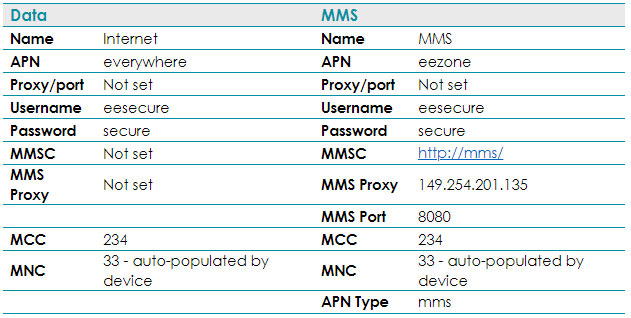
Mozillion mobile internet and MMS APN settings
Here are our APN settings to access the internet and data services.
For most devices, the APN settings are configured automatically when you first install your Mozillion SIM.
If your device doesn’t configure automatically, go to Settings > Mobile Networks on your phone and enter the following APN settings: